Open Trenchr on Axiom, GMGN or Padre / Terminal. Buy in USDC, SOL or ETH, sell a percentage, and track your position in a movable on-page widget. Your balance, trades and PnL stay with your existing Trenchr account.
Customize buy amounts and sell percentages for the website’s trading controls. Saved on this browser. Extension presets can be customized in its Trading settings.
Sign in to manage connected extension sessions.
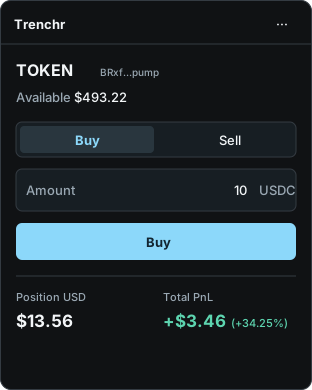
Confirm the selected token, choose your amount and place an order. Your available balance and position show an immediate screen-price estimate while the order saves. Confirmed totals may adjust. Buy and Sell each have their own amount and action button. Open Settings & details for estimate information, receipts and position details, or minimize the panel for more chart space. On Axiom, fills use the chart price captured at your click. Other supported terminals use the latest cached market price, without routing, slippage or market-impact simulation. Fees apply.
Actual extension interface captured with an isolated test account. Balance and trades shown in the panel above are examples.chrome://extensions, enable Developer mode, choose Load unpacked, and select the extracted folder containing manifest.json.Updating an older build? Extract this ZIP into your existing extension folder, then click Reload in chrome://extensions and reconnect. Reload your open terminal pages. Native terminal controls are unchanged; using an unfunded host account avoids accidental real trades. Mobile browsers are not supported.
| Platform | Status | Details |
|---|---|---|
| Axiom | Companion available | On-page widget for Solana, Ethereum and Robinhood Chain. The token is read from the chart URL and resolved automatically; paste a contract address if a route cannot be resolved. |
| GMGN | Companion available | On-page Solana widget. Selects tokens from /sol/token/ links; contract-address selection is also available. |
| Padre / Terminal | Companion available | On-page Solana widget on trade.padre.gg. The token is read from the chart URL; paste a contract address if a route cannot be resolved. |
The widget sits on the terminal page. It does not replace native trade controls or draw on the host chart. Changing pages clears manual token selection.
Confirmed extension orders use your existing account, positions, history, and PnL. The server saves Axiom fills at the chart price captured when you click, with fees applied. Other supported terminals use a cached price estimate. Missing or stale prices produce an error, never a zero-price trade. Ranked reset rules continue to apply; switching interfaces does not reset losses. Manual buys use USDC, USD or the chain’s native currency. Manual sells use a percentage of your held tokens. This release does not add offline order execution.
Site permissions let the extension recognize supported terminal URLs and mount its own widget. The panel uses Trenchr’s account and pricing services; it does not read host page contents, cookies or wallet credentials. Only selected token or market addresses and order details go to Trenchr. No seed phrases or wallet signing are needed. Credentials stay in browser-session extension storage, outside the host page. Closing the browser or reaching the one-hour session limit requires reconnecting. If the network drops, controls disable until the account reconnects. Unconfirmed orders retain their order ID for safe retries. Extension privacy details
In Chrome, open Extensions → Manage extensions → Trenchr → Details. Set Site access to allow the supported trading sites. Confirm the installed version is 0.6.17, reload the terminal page, then choose Open panel from the Trenchr toolbar menu. Use the same Chrome profile for Trenchr sign-in and the extension. Installing the ZIP or visiting this page alone does not install a browser extension. If a market is not selected automatically, open Settings & details → Manual token fallback and paste the token contract address. The account must be connected before selecting or trading. A token needs a recent cached price; unsupported tokens or missing prices cannot fill.